



Did you know that recruiters spend just six to ten seconds scanning a resume before deciding whether to shortlist a candidate? Increase your chances of securing an interview by customising your resume for each job application and making your resume easy to read. Use your resume to your advantage and highlight your great fit for the role!
DO
- Customise your resume for each job application. Adapt your content to reflect the keywords and skills listed in the job description (JD).
- Refer to the JD to identify the knowledge, skills and attributes (KSAs) required for the role. Demonstrate how you meet them.
- Highlight relevant skills that you have acquired through internship, work experiences, CCA and volunteering experiences.
- Demonstrate how your KSAs match the JD using the STAR method.
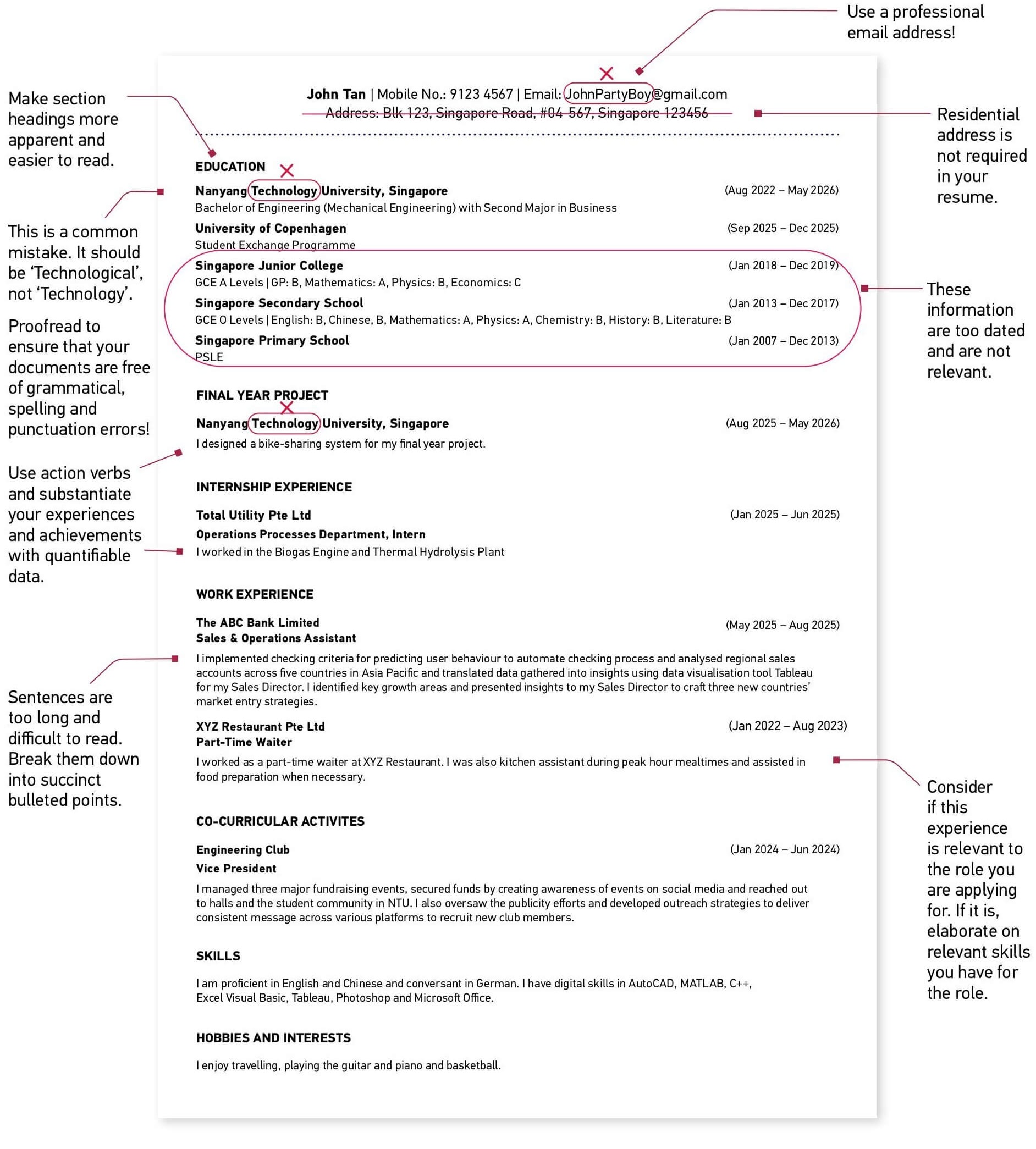
- Use strong action verbs such as developed, implemented, coordinated, analysed, or streamlined.
- Substantiate your experiences and achievements with quantifiable data where possible (e.g. “increased engagement by 25%”, “reduced processing time by 15%”).
- Refer to the JD to pick out industry-relevant keywords that recruiters may be looking for and include them in your resume. This also helps your resume pass through Applicant Tracking Systems (ATS).
- Make sure your resume is easy to read. Keep it to one or two pages. Use bullet points, short phrases and consistent formatting.
- Proofread your resume to ensure that it is free of grammatical, spelling and punctuation errors. The quality of your application reveals your attention to detail and level of professionalism.
- Leverage tools like VMock for AI-powered feedback to improve your resume before sending it out.
DON'T
- Don’t use the same resume for every job you apply to. Recruiters can easily tell when a resume is generic.
- Don’t make unsubstantiated claims. Instead of saying “you have excellent communication skills”, show how you demonstrated them (e.g. “presented weekly updates to project team”).
- Don’t exceed two pages. Keep your content relevant and concise.
- Don’t falsify information. Be honest about your GPA, experience and skills.
- Don’t write generic career objectives. Replace them with a short professional summary that highlights your strengths and aspirations.
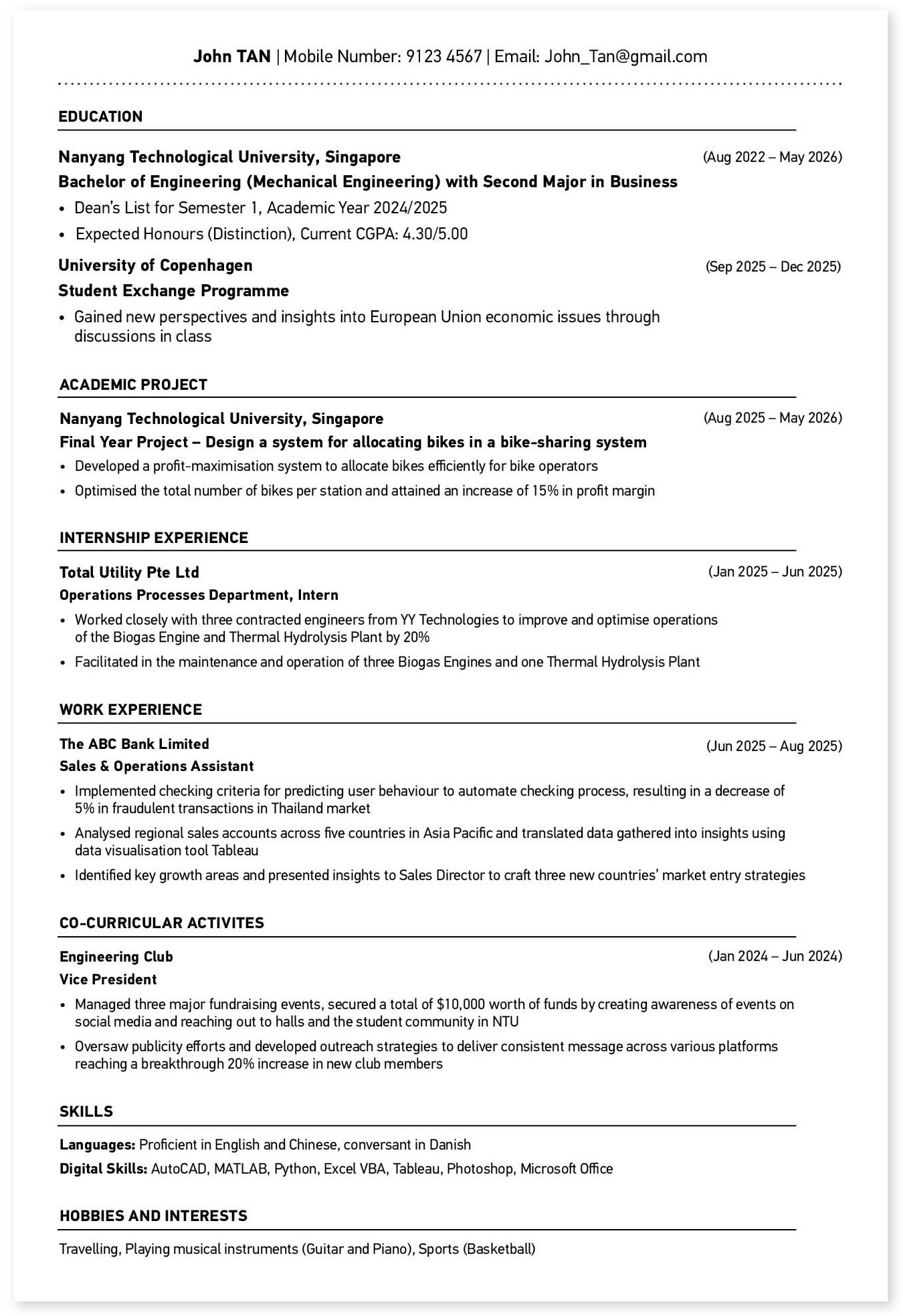
- Don’t use an unprofessional email address. Use your real name (e.g. John_Tan@gmail.com).
RESUME TEMPLATE
CAO recommends using a clean, professional resume template that is ATS-friendly and easy to scan. There is no single “best” format — the key is customisation. Always tailor your resume to match the job description and requirements.
RESUME FORMAT AND PRESENTATION
A well-formatted resume reflects professionalism and clarity.
Follow these best practices:
- Length: one page (for students or entry-level roles) or two pages (for experienced candidates).
- File format: PDF (to preserve formatting).
- Font type: Use clean, professional fonts such as Arial, Calibri, or Garamond.
- Font size: 11–12 pt; headings may be slightly larger.
- Font colour: Black
- Tense: Use past tense for previous roles and present tense for current ones.
- Include LinkedIn or portfolio URL in your header if relevant.
- Save file name as: Name_Resume.pdf
WHAT IS THE STAR METHOD?

Use the STAR method to describe your experiences effectively and demonstrate results.
SITUATION
Describe the situation you encountered.
TASK
Describe the task you had to accomplish.
ACTIONS
Explain what you did to accomplish the task, how you overcame the challenge and why you did it.
RESULTS
State the positive outcomes from your actions, quantifying them where possible.
For example: Led a team of six to organise a cycling event to raise funds for MINDS [Situation/Task].
Through active publicity and marketing [Action], 200 students participated and $5,000 was raised [Result].
If you can’t quantify the results, show that you understand the rationale of what you did.
For example: Led a team of six to conduct research on usability of a new student website [Situation/Task]. Through 10 focus groups [Action], the qualitative and quantitative feedback of 200 respondents were analysed to improve user experience [Result].